


In Mirth Connect, each integration interface is implemented through a channel. Initially, the structure of a channel and the types of connectors may seem somewhat complex. In this article, we explain it in a clear and simple manner.
Channels in Mirth Connect #
A channel is composed of a source connector (source) and at least one destination (destination), so that the output of the source connector is connected to the inputs of the destinations. Through source and destination connectors, the channel receives an input message in a specific format and generates one or more messages in other formats, after applying the transformations included in the connectors.
Additionally, the channel can respond to the system that sent the original message to the source connector, using the output of one of its destination connectors, thus closing the circuit. This is achieved using the ResponseMap data structure.
Moreover, a channel in Mirth Connect:
- Has a global configuration that allows storing encrypted messages in the database and setting the type or duration of their storage (for example: only messages with errors for 30 days without encryption).
- Enables the execution of JavaScript scripts at specific times. For instance, before the source receives the original message (preprocessor script) and right after the destinations send the messages (postprocessor script).
- Possesses data structures for storing variables within the scope of the connectors (ConnectorMap) or the channel itself (ChannelMap).
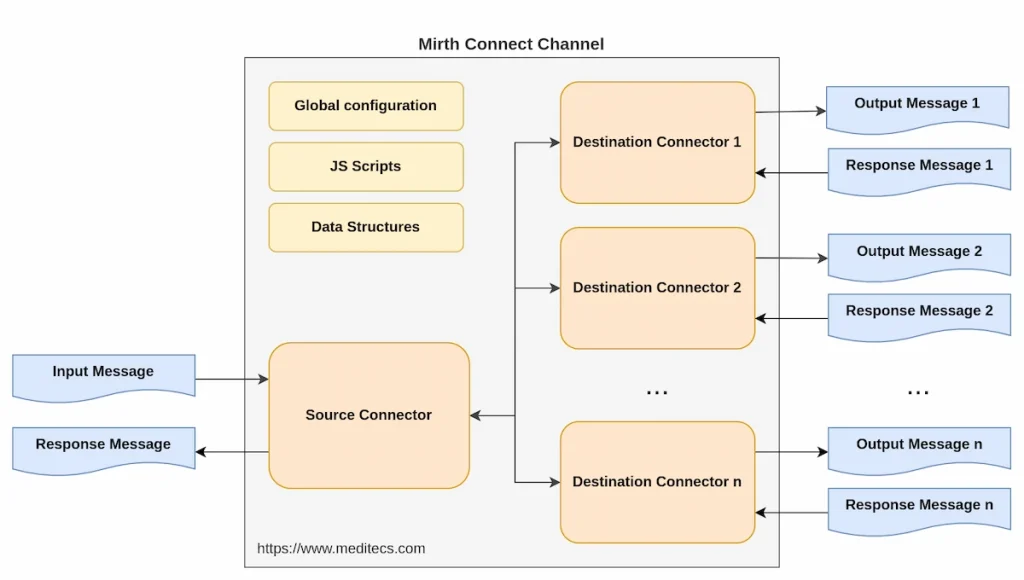
The functioning of each channel in Mirth Connect heavily depends on the type of its connectors. The wide variety of connector types for both sources and destinations is what makes this tool so versatile.
Connectors in Mirth Connect #
There are various types of connectors in Mirth Connect, depending on the origin and destination of the messages being handled. However, regardless of their type, all connectors share the same structure.
Structure of a Connector #
A connector is composed of the following components:
- An Inbound Message Template: This facilitates the manipulation of the incoming message.
- Filters: These define conditions that control the passage of messages.
- Transformers: They manipulate incoming messages to produce the desired outgoing messages.
- An Outbound Message Template: This defines the format or schema of the outgoing message.
- Response transformers: These manipulate outgoing messages before they are delivered to its destination.
Both filters and transformers are optional components, but their use is crucial in configuring and functioning of the connector.
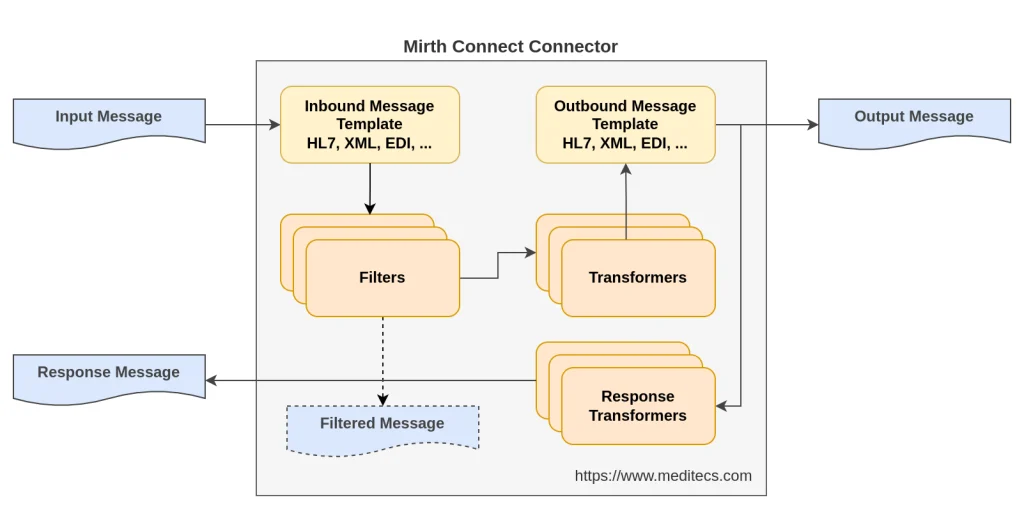
In addition, connectors use data types such as HL7 v2.x, HL7 v3.0, X12, EDI, XML, NCPDP, or DICOM.
Inbound Message Template #
Mirth Connect allows the use of an Inbound Message Template to facilitate the handling of the incoming message, according to the structure and data type set for the incoming message.
The inbound template is the schema or format used to interpret the incoming message. This template acts as a guide for the connector, indicating how it should process and understand the incoming data. For example, if the incoming message is an HL7 document, the inbound template will define the structure of the HL7 segments for proper interpretation.
Outbound Message Template #
Analogous to the inbound template, Mirth Connect allows the use of an Outbound Message Template to facilitate the construction of the outgoing message, according to the structure and data type set for the outgoing message.
The outbound template defines the format or schema of the message that will be sent by the connector. It is a representation of how the message will look after all filters and transformers have been applied. This template ensures that the outgoing message is consistent and in the correct format for the receiving system or process.
Filters #
The filters of a connector are rules that determine if the connector should continue its execution. They consist of a series of conditions that the incoming message must meet for the connector to process it. They act as a control mechanism, allowing only messages that meet certain criteria (for example, specific values in certain fields) to be processed. If a message does not meet the established filters, it is discarded or redirected according to the channel’s configuration.
Typically, expressions like field operator value are used, although they offer other possibilities such as the execution of JavaScript code.
Transformers #
Transformers are responsible for modifying, adapting, or converting the incoming message into the desired outgoing message. They can perform a variety of functions, such as changing data format, adding or removing information, or performing calculations and validations. Transformers are essential for adapting incoming messages to the specific needs of the receiving systems.
Response Transformers #
Response transformers in Mirth Connect are used to modify or process the responses generated by destination connectors before they are returned to the source connector or passed along to the next step in the data flow. This feature is particularly useful in scenarios where the response needs to be formatted or modified based on specific requirements of the receiving system.
Source Connector Types #
Source connectors are capable of obtaining information from a wide variety of sources. However, there are two main types depending on the method used to obtain the data:
- Readers: usually executed at a specific frequency (polling frequency) to read data from a database, files, another Mirth Connect channel, etc.
- Listeners: listen on a port and are based on protocols such as DICOM, LLP, or TCP.
| Type | Source Connector | Description |
|---|---|---|
| Reader | Channel Reader | Reads information from another Mirth Connect channel. |
| Database Reader | Reads from a database query. | |
| File Reader | Reads from a file. | |
| JavaScript Reader | Executes JavaScript code. | |
| JMS Reader | Reads from Java Messaging Service. | |
| Listener | HTTP Listener | Listens on an HTTP endpoint. |
| DICOM Listener | Receives through a DICOM connection. | |
| LLP Listener | Receives through an LLP connection. | |
| TCP Listener | Receives through a TCP connection. | |
| Web Service Listener | Receives through a web service. |
Destination Connector Types #
Analogous to the source connectors, for destination connectors, we have two types depending on how they provide output data:
- Writers: write to a database, files, another Mirth Connect channel, etc.
- Senders: send information using protocols like DICOM, LLP, or TCP.
The following table shows the most commonly used types of connectors:
| Type | Destination Connector | Description |
|---|---|---|
| Writer | Channel Writer | Writes to the input connector of another Mirth Connect channel. |
| Database Writer | Writes to a database using a query. | |
| File Writer | Writes to file. | |
| JavaScript Writer | Executes Javascript code to provide the output. | |
| JMS Writer | Writes to Java Message Service. | |
| Sender | DICOM Sender | Sends using DICOM. |
| HTTP Sender | Sends using HTTP. | |
| LLP Sender | Sends using LLP. | |
| TCP Sender | Sends using TCP. | |
| Web Service Sender | Sends to a web service. |
Relationship between Input and Output Connectors #
As you may have noticed, there is a relationship between input and output connectors, as each input connector has an analogous output connector and vice versa.
In the following table, you can clearly see how they are organized:
| Source Type | Source Connector | Destination Connector | Destination Type |
|---|---|---|---|
| Reader | Channel Reader | Channel Writer | Writer |
| Database Reader | Database Writer | ||
| File Reader | File Writer | ||
| JavaScript Reader | JavaScript Writer | ||
| JMS Reader | JMS Writer | ||
| Listener | DICOM Listener | DICOM Sender | Sender |
| HTTP Listener | HTTP Sender | ||
| LLP Listener | LLP Sender | ||
| TCP Listener | TCP Sender | ||
| Web Service Listener | Web Service Sender |
Conclusion #
The versatility and power of Mirth Connect become evident when we explore the flexibility and variety of options that its channels and connectors offer. By understanding how they work and how they can be effectively combined, developers and IT professionals have at their disposal a formidable tool for creating robust and efficient data integration solutions in the healthcare field.
Mirth Connect stands out for its ability to adapt to a wide range of integration needs, from simple message manipulation to complex integration workflows. This flexibility is largely due to the system’s modular architecture and the variety of connectors available, which allow users to receive, transform, and send information in multiple formats and across different protocols.
When using Mirth Connect, it’s important to remember that careful planning and structuring of channels and connectors are key to the success of any integration project. A deep understanding of the capabilities of each type of connector and how they interact with each other can help developers avoid common mistakes and optimize the performance of their integration interfaces. In summary, investing time in properly understanding and planning your integrations with Mirth Connect is an investment in the effectiveness, sustainability, and quality of your integrated healthcare systems.
You may also be interested in:


