

Mirth Connect 3.9 includes a large number of new features including improved connectivity and REST API. In addition, its 3.9.1 update includes fixes for several relevant bugs. We analyze all the most important new features, and explain how to download and upgrade to this version of Mirth Connect.
Caution: All versions of Mirth Connect 3.9 are affected by vulnerability CVE-2023-43208. To avoid security risks, please use a version equal to or later than Mirth Connect 4.4.1 and update the affected systems as soon as possible. You can download the latest versions from our Mirth Connect download page.
What’s new in Mirth Connect 3.9 #
Version 3.9.0 of Mirth Connect was released on 16 April 2020 and, in addition to the usual enhancements and changes, has as a new feature the complete migration of development to GitHub. So, on the Mirth Connect page on GitHub, you can find the application code, details of its current and future development, and a lot of other information. This change adds to the changes that have been taking place since Mirth® Connect was acquired by NextGen® Healthcare.
Mirth Connect 3.9.1 was released in August 2020. This is an update with some improvements and corrections. Above all, the correction of memory leaks in SMB and SFTP file readers that could penalize the performance of our integrations.
You may want to know more about other versions of Mirth Connect:
The main new features of this new version are as follows:
JSON support in the REST API #
The Mirth Connect REST API has been improved, so that it is now possible to use JSON in addition to XML. It actually still uses XML internally, but an automatic conversion between JSON and XML is performed when using the API.
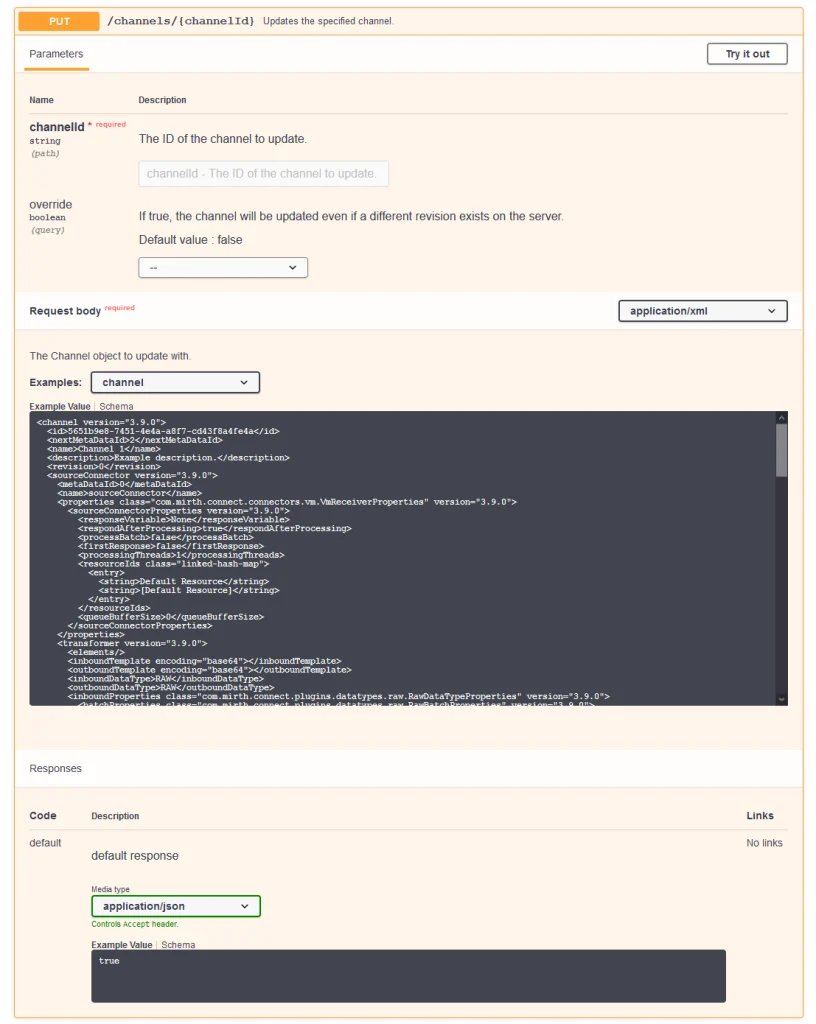
In addition, the REST API documentation, which is based on Swagger, is now better and easier to use.

More information:
- Support JSON as well as XML for the Client core API.
- Update Swagger UI with correct XML and JSON examples.
SMB v2 and v3 protocols support #
The SMB protocol is the file sharing protocol that, although originally created for Windows, is widely used on other systems.
Mirth Connect 3.9.0 includes support for SMB between versions v1 to v3.1.1. It is important to note that when upgrading to this version of Mirth Connect, the File type connectors will undergo the following changes:
- Existing connectors shall be configured to support a minimum version of SMB v1.
- The new connectors will default to SMB v2 as the minimum supported version.
- For security reasons it is recommended to upgrade all existing connectors to a minimum version of SMB v2, as long as it is supported by the system to which we connect.

More information: File Reader / File Writer connections to support SMB2 and SMB3.
TCP Sender supports server mode #
TCP Sender has been upgraded to support server mode, in addition to the client mode it already had. Thus, TCP Sender and TCP Listener have both client and server modes.
When TCP Sender is configured in server mode, it will open a socket and wait for incoming connections. When sending a message through this channel, the message will be sent to all connected clients. In case there are no clients connected, then:
- if queuing is not enabled, an error will occur;
- if queuing is enabled, the message will be queued at least until a client connects.

More information: Add a “server mode” to the TCP Sender connector.
DICOM-related enhancements #
Mirth Connect 3.9.0 includes several enhancements to the DICOM standard:
- The DICOM Listener will now return a negative ACK when an error occurs.
- When theRequest Storage Commitment fails, the DICOM Sender(s ) will mark the message as erroneous or queue the message.
- The DICOM Sender will include the XML command information as a response.
More information:
- DICOM message state shows SENT even when the message fails in PACS.
- DICOM Writer incorrectly shows SENT status when send failed.
Other enhancements in Mirth Connect 3.9 #
In addition to those already discussed, this version of Mirth Connect includes many other enhancements including:
- Dynamic variable replacement from a map for HTTP, SMTP headers, parameters and attachments:
Allow HTTP / SMTP headers / parameters / attachments to be dynamically injected from a map. - Updated Jetty to version 9.4.21 for security reasons:
Upgrade Jetty library to address CVEs. - Mapper transformer steps will not write to the server log:
Remove logger.error from mapper steps. - The Oracle JDBC driver has been updated to version 12.2.0.1 to support the latest version of Oracle 12c:
Update Oracle JDBC driver to 12.2.0.1.
Improvements in commercial extensions #
In addition to the enhancements to Mirth Connect, several of the commercial extensions receive improvements with version 3.9.
Improvements in the Channel History extension #
The Channel History commercial extension has received an update with several improvements:
- Performance improvements:
Improve Channel History diff performance. - Unified and side-by-side comparison:
Add ability to view Channel History diff in unified or side-by-side formats. - Previous and next buttons to navigate through changes:
Add previous/next buttons to navigate changes in Channel History diff.

Please note that commercial extensions are only available to users who have purchased a commercial license for Mirth Connect.
Support for FHIR R4 and R5 on FHIR Connector #
The FHIR Connector extension is an extension to Mirth Connect, formerly free and now part of the commercial extensions, that allows you to connect to systems using FHIR.
This extension has been updated to support the latest versions of FHIR, thus, the currently supported FHIR versions are:
- DSTU 2 (HAPI)
- DSTU2 (reference implementation of HL7.org)
- DSTU2.1
- STU3
- R4
- R5 Preview #1

More information:
What’s new for commercial extensions in Mirth Connect 3.9.1? #
Mirth Connect version 3.9.1 adds the following enhancements to the Interoperability Plugin and SSL Manager commercial extensions:
- Interoperability plugin:
- SSL Manager: Listeners that have SSL enabled through SSL Manager will reject senders if the hostname fails to match any subject alternative names.
Bugs fixed in Mirth Connect 3.9.1 #
Version 3.9.1 includes fixes for three relevant bugs. Including a bug that could slow down to block reading SFTP and a memory leak when accessing SMB file systems.
Polling slowness in SFTP File reader #
When polling using an SFTP file reader, a large number of instances of SftpRequestQueue accumulated, which caused the polling to slow down progressively. This bug was introduced in 3.9.0 and has been fixed in 3.9.1.
More information: Polling Slow down in SFTP file reader due to large number of instances of SftpRequestQueue.
Memory leak using SMB file reader #
This problem is similar to the previous one and caused the possibility of receiving OutOfMemoryErrors errors in case of polling a lot with a SMB file reader. Like the previous one, this bug only appears in version 3.9.0.
More information: Memory Leak in SmbFileConnection.
HTTP sender failure when using new variable mapping #
A new dynamic variable map for HTTP and SMTP was introduced in Mirth Connect 3.9.0. However, when using the map in an HTTP sender with Content-Type x-www-form-urlencoded, the validation failed. This problem has been fixed in version 3.9.1.
More information: Http Sender validation fails when using new “Use Map” option with x-www-form-urlencoded Content-Type.
Conclusions #
Mirth Connect 3.9.0 includes a large number of enhancements and extends the functionality of various components and its 3.9.1 update fixes some important bugs.
First of all, regarding connectivity, Mirth Connect already stood out for its ability to connect to almost any system, so we are glad that the number of supported versions and protocols will increase. From this version onwards we will be able to use more versions of SMB, the server mode in TCP Sender and, especially, the most recent versions of FHIR, which is becoming increasingly important in healthcare interoperability.
Secondly, the REST API allows us to integrate with other tools in our environment and access Mirth Connect without using the Administrator. This improvement of its documentation and the possibility of using JSON will surely help us to exploit even more the possibilities of this API.
How to upgrade to Mirth Connect 3.9 #
When upgrading to Mirth Connect 3.9 we must take into account, above all, two of the changes included in this version:
- The change in File Writer and File Reader to support more versions of SMB will cause existing channels to be configured with SMB v1 as the minimum version, but it is recommended to review them and set them to the highest supported version to avoid security risks.
- The functionality of the “Request Storage Commitment” option of DICOM Sender has changed:
- Prior to 3.9.0, if this option is enabled and thestorage request commitment fails, it will be marked as an error in the log, but the message will be considered successful.
- From this version of Mirth Connect onwards, the message will be marked as an error. So, when updating, errors may appear in DICOM Senders that did not appear before.
- It is recommended to make sure that the target system supports storage commitment or to turn off the “Request Storage Commitment” option.
More information:
- Mirth Connect 3.9.0:
- Mirth Connect 3.9.1:
We always recommend waiting at least until the first revision of each version (X.Y.1) before upgrading production systems. In this case, since version 3.9.1 has been released, we already have a release candidate for production use. But let’s not forget to always test our integrations very well when changing the version of Mirth Connect.
You may be interested in the following articles:
- How to choose the most suitable version of Mirth Connect?
- How to make sure your server meets the Mirth Connect system requirements.
Download Mirth Connect 3.9 #
Mirth Connect 3.9 is available for download, along with all other versions, from our Mirth Connect download page and from the NextGen Healthcare website. Download it now to test all its new features.


